
Google announced 24 new features to its Android and iOS apps, Google Events, and Hangouts, just in time before the holidays. Here is a rundown of the biggest updates.
With the holidays just around the corner, Google is in a giving mood. The Internet giant announced today 24 new features being added to its Google+ Android and iOS apps, Google Hangouts, and its Google+ Web app. There’s really something for everyone, “[w]hether you’re an iPhone or Android addict, a budding broadcaster, or the resident party planner,†Google Vice President of Engineer Dave Besbris writes. Here is a quick rundown of the most significant new features.
Google+ Android app
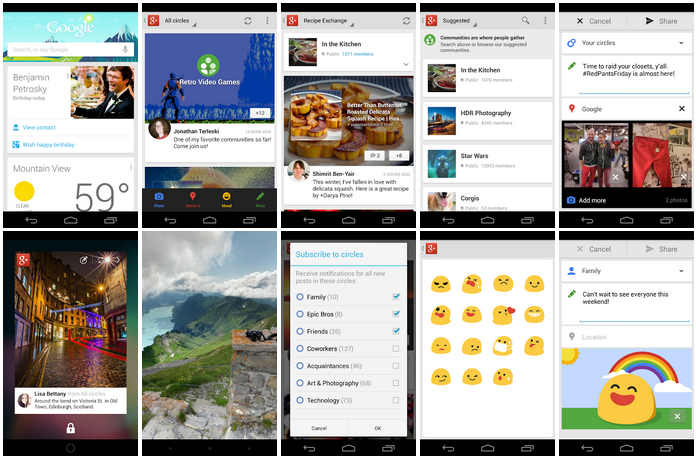
Let’s start with the Android app: Users can now edit their profiles within the app. Publishing new content is now even easier than before, thanks to streamlined functionalities. And Google+ is finally taking a page from its competitors, Facebook and Twitter, with a notification alerting users to new posts from their circles. Users can also individually subscribe to notifications from their circles.
The update also integrates Google+ Communities, which is Google’s take on Facebook Groups, and helps drive interaction between users. Google+ members can now publish their own posts, comment, and consume the content published by other community members from an Android mobile device.
If you’ve been using Google Instant to automatically upload photos taken from your smartphone, take heed: Google is dropping unlimited photo storage of photos, but will no longer restrict the size of images that can be uploaded. Free storage is now limited to 5GB. Google’s Photo Sphere feature will now be supported on Google+, so users can enjoy creating 360 degree panoramic photos and uploading the images onto their profiles. Note that, to use Photo Sphere, you’ll need to upgrade to Android 4.2; and to see these images, you’ll need any device that has Froyo or later installed.
Other more minor additions to the Android app are emoticons called “moods,†support for animated GIFs (because who doesn’t enjoy a GIF), birthday reminders by way of Google Now, and a lock screen widget.
Google+ iOS app
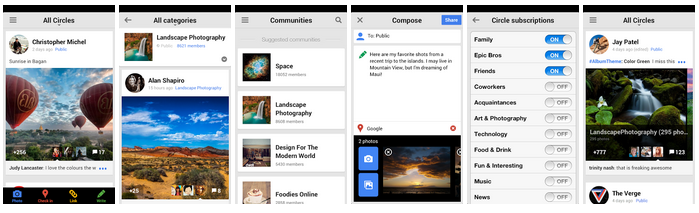
As for the Google+ iOS app, users can now “swipe through photo albums inline,†and tap on the photo to expand for full-screen viewing. The final update here is a new “subtle pan-zoom-scale effect†for users viewing photos. New “conversation cards†will also be rolled out, and these updates include longer snippets, larger photos, and comments that “slide in beneath each post.â€
Google+ Events
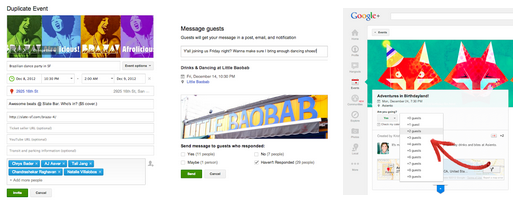
If you’re looking to organize events during your holidays, Google+ Events now offers the features to make it a reliable platform for organizing those get-togethers. Event organizers can now send messages to select guests, while seeing who has opened up the invitation. Sending these invitations can happen one or more of two ways: Organizers can send invitations through Google+, or send the URL of the event through any channel, like IM, email, or even Facebook. Now RSVPs will include a request for the number of guests that the invitees plan to bring. And as an added bonus, the event can be duplicated and auto-filled, should organizers want to plan similar events in the future.
Hangouts
Hangouts is also getting two upgrades. The group video chat feature will now only require 150KB of bandwidth, meaning that you can hang out with anyone around the world regardless of the quality of their Internet connection.

Finally, if you’re a frequent user of Google Hangouts on Air â€" Google’s live stream broadcast feature â€" Google is removing the thumbnail of your video feed if you’re the only person in the Hangout. The video will now be expanded to its full-screen glory, doing away with the waste of white space that used to appear when you were the only person with a streaming video feed in Hangouts.

No comments:
Post a Comment